

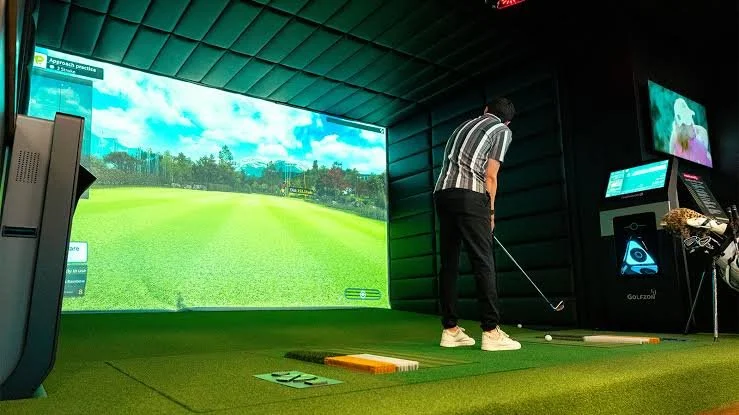
How Can a Golf Simulator Help You Improve Your Game?
A golf simulator can be a valuable practice tool when it is used with a clear plan. Instead of simply hitting shot after shot, golfers can use simulator sessions to focus on specific clubs, distance control, swing consistency, different shot types, performance feedback, and simulated rounds.
The key is to make every practice session purposeful.
For Orange County golfers, indoor golf can also make consistent practice easier. Weather, daylight, course availability, and busy schedules can sometimes make outdoor practice difficult to maintain. A private indoor environment provides another way to keep working on the game throughout the year.
FlagStix Golf Club is located in Villa Park and provides members with year-round access to indoor golf simulators for targeted practice and play. The private, members-only environment may be a great fit for golfers who want a consistent place to work on their game at their own pace.
1. Build a Structured Simulator Practice Routine
Avoid Random Practice
One of the easiest mistakes golfers can make with simulator practice is approaching every session without a specific goal.
Hitting different clubs randomly may feel like practice, but it does not always provide a clear direction for improvement. A more structured approach can make it easier to understand what you are working on and whether your practice is helping.
Before starting a simulator session, decide what you want to accomplish.
Your goal might be:
Improving swing consistency
Establishing club distances
Practicing a specific club
Working on distance control
Repeating a particular shot
Evaluating performance
Practicing different shot types
Playing a simulated round
Having a goal gives the session a purpose.
Purposeful practice is also a common theme in golf instruction. The PGA of America recommends approaching practice with structure and intention rather than simply hitting balls without a plan. You can learn more about building a more focused practice routine through this PGA.com guide to making the most of your practice sessions.
Divide Practice Into Specific Areas
A structured practice session does not need to focus on only one skill.
You could divide your time into different sections. For example, start with a short warm-up, spend time working on a specific club or swing goal, practice distances, and finish with simulated course play.
The exact structure can vary from golfer to golfer.
What matters is that the session has a clear purpose rather than becoming a series of random swings.
Repeat the Same Practice Process
Consistency in your practice routine can be just as important as consistency in your swing.
Using a similar structure from session to session can help you compare your results and identify areas that may need more attention.
Over time, this approach can make it easier to recognize patterns in your golf game.
2. Establish Your Club Distances
Why Knowing Your Distances Matters
Distance control is a fundamental part of playing better golf.
If you have a general understanding of how far you hit each club, you can make more informed decisions during a round. The goal is not simply to hit the ball farther. It is to understand your typical distances and become more consistent with them.
A simulator can provide a convenient environment for working through different clubs and practicing repeated shots.
Practice Different Clubs
Instead of trying to establish every distance in one session, work through your clubs over multiple practice sessions.
You might dedicate time to your irons one day and focus on other clubs during another session.
The purpose is to become more familiar with how each club performs and how consistently you produce your typical results.
Focus on Repeatable Distances
One unusually long shot does not necessarily tell you how far you should expect a club to travel during a round.
For practical golf, repeatability matters.
Pay attention to the distances you can produce consistently rather than building your entire club-selection strategy around your best shot.
This can help create more realistic expectations when making decisions on the course.
3. Use Practice to Improve Shot Consistency
Quality Repetition Matters
Repetition can be useful, but repetition without purpose is not necessarily productive.
When practicing on a simulator, focus on repeating a particular type of shot or swing goal. This gives you an opportunity to see whether you can produce similar results repeatedly.
For example, you might practice several shots with the same club while focusing on consistent contact and a repeatable swing.
The goal is not to make every shot perfect. The goal is to understand your patterns and work toward more predictable results.
Practice Specific Clubs
Different clubs require different types of attention.
You may find that one club is already consistent while another requires more practice. A structured simulator session allows you to spend more time on the clubs that need additional attention.
Rather than giving every club the same amount of practice time, consider prioritizing the areas of your game that need the most work.
Practice Different Shot Types
Golf is not made up of one type of shot.
Depending on your goals, simulator practice can be used to work on different shot situations and club choices. Practicing a variety of shots can help prevent your sessions from becoming too repetitive while keeping them focused.
The important thing is to practice with a reason.
4. Use Performance Feedback to Guide Your Practice
Look for Patterns
Performance feedback can be most useful when it helps you identify patterns.
Instead of focusing on one good or bad shot, look at what happens across a series of shots.
Are your distances inconsistent? Are you struggling with a particular club? Do certain types of shots produce less predictable results?
Questions like these can help determine what to practice next.
Track Your Improvement
Tracking practice over time can help make your sessions more meaningful.
You do not need to track every possible detail. Focus on information that is relevant to your goals.
For example, you might keep notes about:
Club distances
Practice goals
Shot consistency
Areas that feel difficult
Results from repeated practice
Changes you notice over time
The purpose of tracking is not to create unnecessary complexity. It is to give your practice direction.
Avoid Chasing Individual Results
A single excellent shot does not necessarily mean your swing has changed permanently.
Likewise, one poor shot does not mean your entire practice session was unsuccessful.
Look at trends rather than isolated results. This can help you make more sensible decisions about what to practice next.
Simulated Rounds Can Help Connect Practice to Course Play
Simulator practice does not have to stay focused on individual shots.
Simulated rounds can provide an opportunity to apply your skills in a broader golf setting.
During a simulated round, you can think about:
Club selection
Distances
Shot consistency
Course strategy
Decision-making
Playing one shot at a time
This can make practice more connected to the way you actually play golf.
A golfer might spend part of a session working on a specific club and then use a simulated round to see how that practice fits into a broader round.
Simulated play can also help prevent every practice session from becoming purely technical. Golf is ultimately about playing the course, making decisions, and managing your game.
Build a Repeatable Weekly Practice Routine
A structured routine can make simulator practice easier to maintain.
For example, a golfer could organize different sessions around different goals.
Session 1: Club and distance work
Focus on establishing realistic distances and practicing specific clubs.
Session 2: Swing and consistency
Work on a particular swing goal and repeat shots with a consistent approach.
Session 3: Shot practice
Practice different shot types while keeping the session focused on specific situations.
Session 4: Simulated round
Use simulated play to bring different parts of your game together.
You do not need to follow this exact structure. The important principle is to give each practice session a purpose.
A repeatable routine can also make it easier to track what you have worked on and what needs more attention.
Use Indoor Practice Alongside Outdoor Golf
A golf simulator can be an excellent addition to an overall golf routine, but it does not have to replace outdoor golf.
Playing outside provides experiences that are part of the game itself. Outdoor conditions, actual course surroundings, changing lies, wind, and real course situations all contribute to becoming a more complete golfer.
Indoor practice can complement that experience.
You might use a simulator to work on swing consistency and distance control during the week and then use outdoor rounds to apply those skills.
This combination allows each environment to serve a different purpose.
The goal is not to choose between indoor and outdoor golf. It is to use each type of practice strategically.
Why Consistency Matters More Than Random Practice
Improving your golf game requires time and repetition.
A single practice session is unlikely to transform every part of your game. What can make a difference is developing a routine that allows you to repeatedly work on the areas that matter most.
Consistency can help you:
Identify weaknesses
Practice specific skills
Become more familiar with your clubs
Understand your distances
Evaluate your performance
Adjust your practice goals
Build better habits
This is why a convenient indoor environment can be valuable.
When practice is easier to fit into your schedule, maintaining a routine can become more realistic.
Why FlagStix Golf Club May Be a Great Environment for Purposeful Practice
FlagStix Golf Club may be a great environment for Orange County golfers who want to make indoor practice a consistent part of their golf routine.
Located in Villa Park, FlagStix is a private indoor golf facility built for golfers focused on improving their game and developing their skills at their own pace.
Members have year-round access to indoor golf simulators for targeted practice and play. This can give golfers an opportunity to structure sessions around swing work, distance control, shot consistency, performance-focused practice, and simulated rounds.
FlagStix is also members-only, with intentionally limited membership designed to help maintain simulator availability and preserve a private, high-end environment.
For golfers who prefer privacy and reduced crowding, this can create a more focused setting for purposeful practice.
Golfers throughout Orange County—including Orange, Anaheim Hills, Fullerton, Brea, Yorba Linda, Tustin, Placentia, North Tustin, Santa Ana, Irvine, Costa Mesa, Newport Beach, Fountain Valley, Garden Grove, Cypress, La Habra, Buena Park, and surrounding areas—may find a private indoor option useful when building a more consistent golf routine.
To learn more about the facility and its approach, golfers can visit the About FlagStix Golf Club page.
The value of a simulator ultimately comes down to how you use it. With a clear practice plan and realistic goals, indoor golf can become a useful part of a broader approach to improving your game.
Frequently Asked Questions
1. Can a golf simulator help improve your golf game?
A simulator can be a useful practice tool when used with a structured routine. Golfers can use simulator sessions to work on swing consistency, club distances, shot practice, performance feedback, and simulated rounds.
2. How often should I practice with a golf simulator?
There is no single schedule that works for every golfer. A consistent routine that fits your schedule is generally more practical than occasional, unstructured practice. The important thing is to practice with clear goals and give yourself time to evaluate your progress.
3. Can a simulator help with distance control?
Yes. Golfers can use simulator sessions to practice different clubs and work toward more consistent distances. The goal should be to understand realistic, repeatable distances rather than focusing only on an occasional maximum-distance shot.
4. Should simulator practice replace outdoor golf?
No. Indoor and outdoor practice can complement each other. A simulator can provide convenient, structured practice, while outdoor golf gives golfers experience with actual course conditions and real playing situations.
5. Where is FlagStix Golf Club located?
FlagStix Golf Club is located in Villa Park, California, and provides a private, members-only indoor golf environment for Orange County golfers.
Turn Simulator Practice Into a More Purposeful Routine
A golf simulator is most useful when it becomes part of a structured practice routine rather than a place to hit random shots.
Start with clear goals. Work on specific clubs and distances. Focus on repeatable shots. Use performance feedback to identify patterns. Track meaningful changes over time, and use simulated rounds to connect practice with course strategy.
At the same time, continue using outdoor golf to experience real course conditions and apply what you have practiced indoors.
For Orange County golfers looking for a private environment for consistent indoor practice, FlagStix Golf Club is located in Villa Park and provides members with year-round access to indoor golf simulators for targeted practice and play.
If you want to learn more about FlagStix or have questions about membership and the facility, you can contact FlagStix Golf Club.
If you want to make your practice more structured and purposeful, consider how a private indoor environment like FlagStix Golf Club could fit into your overall golf routine.
